
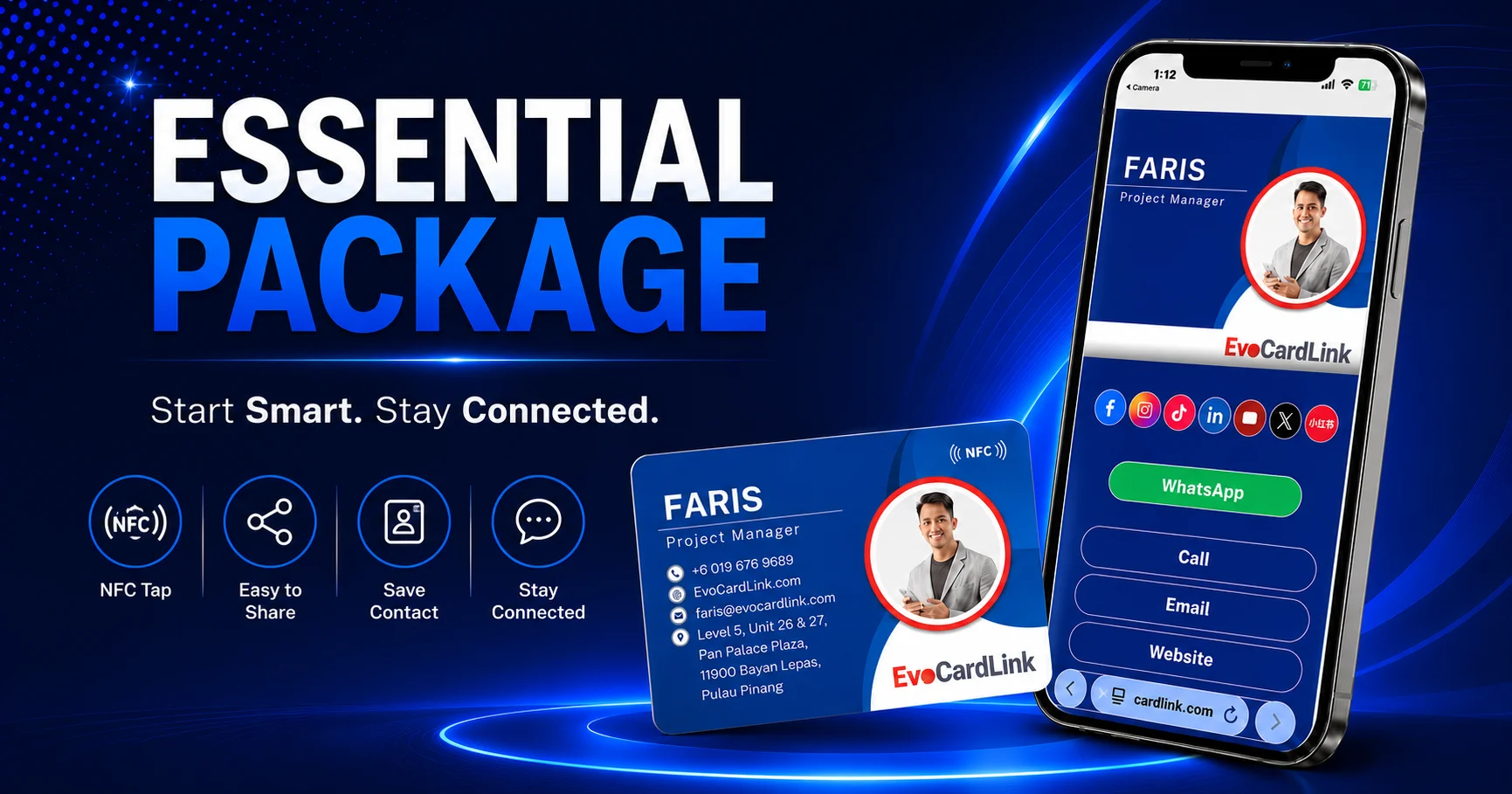
EvoCardLink Essential Package
Start Smart. Stay Connected.
Replace your traditional paper name card with a complete, ready-to-use NFC digital business card that helps customers save your contact details, reach you faster and reconnect with you after the meeting.
The EvoCardLink Essential Package combines a professionally designed physical EvoCard with a matching EvoLink digital business card. Everything is prepared and connected for you, so you can start sharing through NFC tap, QR code or one simple digital link.
RM89.90 Per Set
Included
- Custom-designed physical NFC EvoCard
- Matching EvoLink digital business card
- Dual QR codes for profile sharing and contact saving
- Done-for-you setup
- No app installation required
Complete Setup
More Than Just a Physical NFC Card
Some NFC card solutions provide only the physical card. After receiving it, you may still need to create your own digital profile, prepare the contact buttons, generate QR codes and connect everything correctly.
EvoCardLink Essential removes this roadblock.
You provide your information and select your preferred card design. Our team prepares the physical EvoCard, matching EvoLink profile, NFC connection and QR codes as one complete solution.
You do not need to build the digital business card yourself or manage a complicated technical setup.
Physical + Digital
One Complete Physical and Digital Business Card Solution
EvoCard — Your Physical NFC Business Card
EvoCard is the professionally designed physical card that you carry to meetings, events and customer appointments.
Customers can tap the card with a compatible smartphone to open your EvoLink profile. A printed QR code provides an alternative for customers who prefer to scan.
EvoLink — Your Interactive Digital Business Card
EvoLink is the digital profile that customers see after tapping, scanning or opening your shared link.
It brings your essential contact details, business information and important action buttons together on one mobile-friendly page.
Done-for-You Setup
We prepare and connect the important components for you, including profile layout, NFC destination, EvoLink QR code, vCard contact QR code, WhatsApp link, contact buttons, website links, social links and map links.
Your Essential Package is prepared for practical daily use, not simply supplied as an unconfigured NFC card.
What Is Included in the Essential Package?
Custom-Designed Physical NFC EvoCard
Receive one professionally designed physical NFC business card based on your selected template and submitted business information.
Your card can include your name, job title, company, logo, contact information and QR codes while maintaining a clean and professional presentation.
Matching EvoLink Digital Business Card
Your EvoLink profile is designed to complement your physical EvoCard, giving customers a more consistent experience when they move from the physical card to your digital profile.
- Name and job title
- Company or business name
- Profile photograph
- Company logo
- Short business introduction
- Contact information
- Website and online-store links
- Social media profiles
- Business location
NFC Tap Sharing
Customers with compatible smartphones can tap your EvoCard to open your EvoLink digital business card.
There is no need to manually type your website address, phone number or social media username.
Dual QR Code Sharing
The EvoLink QR Code opens your complete EvoLink digital business card, where customers can view your information and select how they want to connect with you.
The vCard QR Code allows customers to access your contact details quickly and save them to their phone. The QR codes also provide a reliable backup when NFC is unavailable or turned off.
Add to Contact Function
Customers can download and save your contact details more easily instead of manually entering your name, phone number, email address and company information.
This helps reduce the possibility of your contact details being forgotten after the first meeting.
WhatsApp, Call and Email Buttons
Make it easy for customers to take immediate action directly from your EvoLink profile.
- Call
- Website
- Online store
- Enquiry link
Website, Social Media and Location Links
Bring your important online channels together in one place.
- Website
- TikTok
- YouTube
- X
- XiaoHongShu
- Google Maps
- Waze
Customers no longer need to search separately for your website, social media account or business location.
Eco Journey
Using a reusable digital business card can help reduce dependence on repeatedly printed paper name cards.
The Essential Package includes Eco Journey features that help support more environmentally responsible networking through paper-saving awareness, analytics and practical tips.
No App Installation Required
Customers do not need to download or install an EvoCardLink application.
Your EvoLink digital business card opens through the smartphone browser using NFC tap, QR scan or a direct link.
Sharing Methods
Three Ways to Share Your EvoCardLink
Tap During Face-to-Face Meetings
Invite the customer to tap your EvoCard with their smartphone. Your EvoLink profile opens, allowing them to save your contact or communicate with you immediately.
Scan the QR Code
Customers can scan the printed QR code when their phone does not support NFC, NFC is turned off, or they simply prefer using their camera.
Share Your EvoLink Digitally
Your digital business card is not limited to physical meetings. You can share the EvoLink through WhatsApp, email, social media, online enquiries, digital documents, email signatures and online meeting chats.
Even when you forget to bring your physical EvoCard, you can open your EvoLink on your phone and let the customer scan the QR code or send them the link directly.
Customer Actions
What Customers Can Do After Opening Your EvoLink
Once your EvoLink digital business card opens, customers can view your profile, save your contact details, message you, call you, email you, visit your website, open your online store, view your social media profiles, find your business location and share your EvoLink with someone else.
Instead of giving customers information that they must process later, EvoCardLink helps them take the next step while your conversation is still fresh.
- View your professional profile
- Save your contact details
- WhatsApp you
- Call you
- Send you an email
- Visit your website
- Open your online store
- View your social media profiles
- Find your business through Google Maps or Waze
- Share your EvoLink with someone else
Practical Benefits
Why EvoCardLink Essential Is More Practical
Make a More Professional First Impression
A matching physical and digital business card creates a more complete presentation than using an unbranded NFC card or a generic digital profile.
Make Contact Saving Easier
Customers can save your information without manually typing every detail into their phone.
Encourage Faster Communication
WhatsApp, call and email buttons remove unnecessary steps between receiving your card and contacting you.
Continue Sharing After the Meeting
Your EvoLink can be shared digitally, allowing customers to forward your profile to colleagues, friends or potential referrals.
Avoid Complicated DIY Setup
The physical card, digital profile, QR codes and contact buttons are prepared as one connected solution.
Update Without Reprinting Everything
Your EvoLink information can be updated without replacing the physical card every time your contact information changes. The available update method will depend on your account and service arrangement.
Reduce Dependence on Disposable Paper Cards
A reusable NFC card and shareable digital profile can help reduce repeated paper-card printing while supporting more sustainable networking habits.
Best For
Who Is the Essential Package Best For?
EvoCardLink Essential is designed mainly for individual professionals and small-business users who frequently meet customers, prospects or business contacts.
The package is particularly useful when your main goal is to help customers save your contact details and communicate with you more conveniently.
- Sales representatives
- Property agents and negotiators
- Insurance and financial advisors
- Automotive sales advisors
- Freelancers
- Consultants
- Coaches and trainers
- Beauty and wellness professionals
- Service providers
- Entrepreneurs
- Small-business owners
- First-time digital business card users
Setup Process
Simple Done-for-You Setup Process
Choose Your EvoCard Design
Select your preferred physical card template or provide your branding direction.
Fill In a Simple Online Form
Submit the information required for your physical and digital business cards, including name, job title, company name, phone number, email address, website, profile photo, company logo, social media links and location links.
We Prepare Your Physical Card Design
The EvoCardLink team prepares your physical EvoCard artwork based on your selected design and submitted information.
Review and Confirm the Design
You review the proposed card design and confirm the artwork before printing.
We Prepare Your Matching EvoLink
Your EvoLink digital business card is prepared to complement the confirmed physical card design. The contact buttons, links, NFC destination and QR codes are configured and checked.
Printing and NFC Setup
After design confirmation, your EvoCard is printed, programmed and connected to your EvoLink profile.
Start Sharing Professionally
Use your EvoCard through NFC tap, QR scan or digital-link sharing during meetings, events, appointments and online conversations.
Choose Essential If You Need
- One physical NFC business card
- One matching digital business card
- Professional contact sharing
- NFC tap and QR code options
- Easy contact saving
- WhatsApp, call and email buttons
- Website, social media and location links
- A complete done-for-you setup
- A straightforward solution without unnecessary complexity
Consider the Pro Package If You Need
The Essential Package focuses mainly on professional contact sharing.
The Pro Package may be more suitable when you also need lead capture, prospect information collection, follow-up management, additional call-to-action buttons, appointment or enquiry buttons, PDF catalogue previews, YouTube video previews, Google Maps preview blocks, product showcases and visitor analytics.
Compare Essential and ProFAQ
Frequently Asked Questions
What is included in the EvoCardLink Essential Package?
The Essential Package includes a custom-designed physical NFC EvoCard, a matching EvoLink digital business card, dual QR code functions, contact action buttons, website and social links, location links, Eco Journey features and done-for-you setup.
How much is the Essential Package?
The EvoCardLink Essential Package is priced at RM89.90 per set.
Do customers need to install an application?
No. Customers can open your EvoLink digital business card using their smartphone browser. No EvoCardLink application is required.
What happens if the customer’s phone does not support NFC?
The customer can scan the QR code printed on your EvoCard. You can also share your EvoLink directly through WhatsApp, email or another digital channel.
What is the difference between the EvoLink QR code and vCard QR code?
The EvoLink QR code opens your complete digital business card profile. The vCard QR code focuses on helping customers access and save your contact details more quickly.
Can I share my digital business card without the physical card?
Yes. You can send your EvoLink directly through WhatsApp, email, social media or another communication platform. You can also display the QR code from your phone for customers to scan.
Can customers save my contact information?
Yes. Your EvoLink includes an Add to Contact function that allows customers to download your contact details to their phone.
Can I update my information later?
Yes. Information displayed through your EvoLink can be updated without reprinting your physical EvoCard. The update process depends on your account and service arrangement.
Can I use EvoCardLink for my website or online store?
Yes. Your EvoLink can include a button linking customers to your company website, personal website, online store, product page or another selected online destination.
Is Essential suitable for a company team?
Essential is primarily designed for individual users. Companies that need multiple employee profiles, centralised management, consistent corporate branding, team analytics or staff administration should consider the Corporate Package.
What is the main difference between Essential and Pro?
Essential is designed for professional contact sharing. Pro includes the Essential features and adds richer business showcases, lead capture, follow-up functions, additional CTA buttons and visitor analytics.
Start Sharing More Professionally
Your business card should do more than display your name and phone number.
EvoCardLink Essential helps customers save your details, contact you immediately and reconnect with your business after the meeting, all through one professionally prepared physical and digital business card solution.